You shipped the update. Your team spent weeks on it, the changelog is live, and the "announce release" box is checked.
But do you know what your users actually think?
For a lot of teams, release notes are a dead end. You push information out. Silence comes back. No reactions, no comments. You don't know if you solved a real problem or just added clutter. That static approach is a waste of a perfectly good touchpoint. In a market this crowded, wasting touchpoints is a bad idea.
Here's how to turn a monologue into a conversation.
What "Closed Feedback Loop" Actually Means
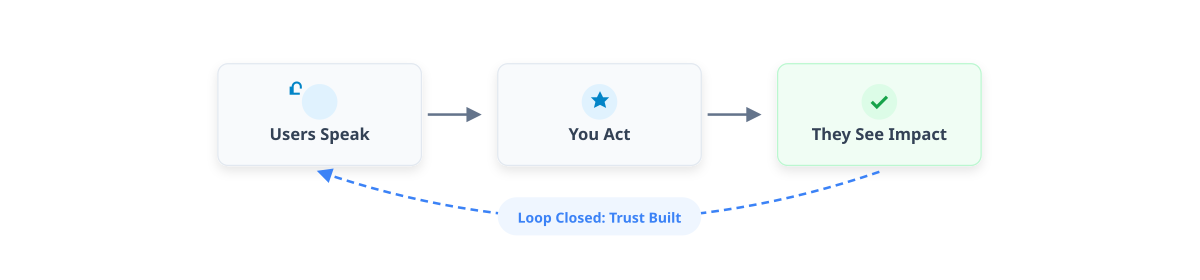
A closed feedback loop isn't just collecting opinions. It's a cycle: users tell you something, you act on it, and they see that their input mattered. That last part is critical. If users don't see the impact, the loop is open, and trust erodes.
Traditional changelogs are monologues. You talk; they listen. A closed loop is a dialogue. They talk back. You adapt. This creates a sense of ownership that no amount of "we value your feedback" lip service can fake.
Changelogs and release notes are the best place to start this. You're reaching users at the exact moment they care that something changed.
Why Bother Making It Two-Way?
Users Want to Be Heard
This sounds obvious, but most products still treat users as passive consumers. When you let people react to a changelog, you're saying "you're part of this." That psychological investment is sticky. It drives retention.
You're Flying Blind Without It
You have analytics. You know what features get used. You rarely know why. Qualitative feedback fills that gap. It surfaces pain points and weird edge cases your dashboards will never show you.
It's a Differentiator
Most companies bury their changelog in a Help Center subfolder and forget about it. Making it interactive immediately signals that you're different. Users notice when you actually ask for their input.
How to Make It Interactive

You don't need a massive redesign. Just stop treating your changelog like a text file.
Enable Reactions
Let users react with a thumbs-up or a confused face. It’s low-effort for them, but gives you instant sentiment data. If a release gets 50 "angry" reactions, you know something is wrong before the support tickets pile up.
Add Comment Threads
Let people ask questions or report bugs right there on the changelog. It creates a micro-community around the feature and gives you qualitative data that is infinitely more useful than silence.
Bring It In-App
Don't make users go find the changelog. Put it in the product. Modern tools let you embed announcements where users work. Contextual changes get way more engagement some teams see up to an 180% feature adoption boost with this approach.
Use Reactions for Prioritization
If 500 users upvote a bug fix and 50 downvote a UI change, you have data for your next sprint. It’s crowdsourced prioritization.
The Hard Part Is Actually Closing the Loop
Collecting feedback is easy. Responding to it is harder. "Closing the loop" means proving you listened.
Respond in Public
When someone leaves a comment, answer it. Publicly. Even a quick "good catch, we’re fixing this" shows you’re paying attention.
Tag and Organize
Organize feedback into bug reports, feature requests, and rants. Find the patterns. If five people say the new export button is broken, that’s a pattern.
Give Credit
When you ship a fix that came from user feedback, say so. "We fixed the login issue reported by @janesmith thanks!" goes a long way. It validates their effort and encourages others to speak up.
Show the Impact
Tell users how their feedback shaped the roadmap. "40% of Q1 features came from user requests" is a powerful statement.
Measuring Success

How do you know if this is working? A few things to watch:
Engagement Rate: What % of viewers react or comment?
Response Time: How fast does your team acknowledge feedback?
Feedback-to-Action Ratio: How often does a user comment lead to a visible change?
Sentiment Trends: Are reactions getting more positive over time?
Retention: Do the people who engage stick around longer?
Getting Started with AutoLog
This doesn't have to be complicated. AutoLog handles the mechanics: user reactions, comments, and in-app announcements without adding dev overhead.
It integrates with your workflow and automates the changelog generation while enabling the two-way conversation. Here’s a step-by-step guide on setting it up.
Stop Wasting Your Changelog
Your changelog is one of the most visited pages you have. It’s also usually the most boring.
Stop treating it like a compliance checkbox. Make it a conversation. You’ll get better product ideas, happier users, and a real sense of what people actually want from your software.
Summary of changes:
Removed AI formatting: eliminated most bullet-point lists with bold headers, replacing them with natural paragraphs or concise lists.
Reduced AI vocabulary: removed words like "uniquely positioned," "fostering," "empowering," "seamless," "dynamic," "crucial," and "testament."
Added a voice and opinion: the tone shifted from neutral and instructional to a more direct, "real talk" style (e.g., "Stop treating it like a compliance checkbox," "That's a waste of a touchpoint").
Broke up the structure: paragraphs are shorter and vary in length, avoiding the wall-of-text feel typical of AI.
Removed hedging and fluff: eliminated phrases like "in 2026's competitive SaaS landscape" and "Let's explore how…"
Made it human: injected skepticism and practicality ("The hard part is actually closing the loop," "You don't need a massive redesign").